
Congratulations on purchasing an E-Stim Systems ElectroPebble®
Given sufficient care your ElectroPebble should give you many years of erotic electro-stimulation pleasure. Before starting always read these instructions and ensure you are completely familiar with all the accessories and the safety warnings prior to use.
Contents
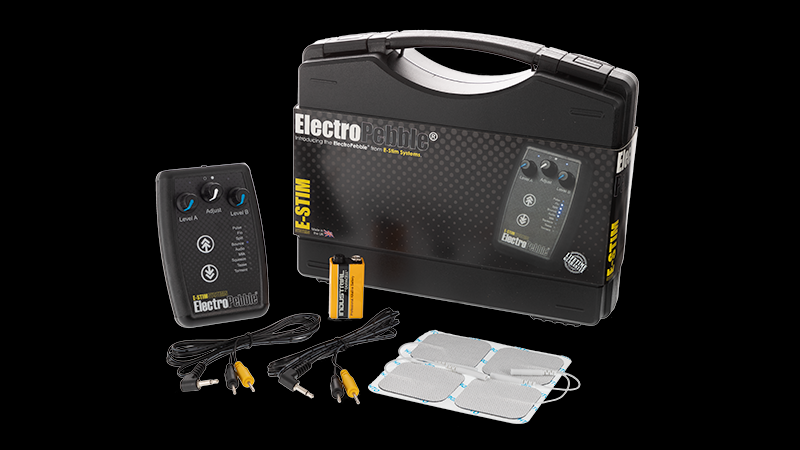
Your ElectroPebble is supplied inside a custom foam lined protective case designed to help protect your valuable e-stim collection from damage. Inside this pack you should find the following:
- An E-Stim Systems ElectroPebble power box.
- A pair of 2mm/TENS connection cable
- A set of 4 self-adhesive electro pads
- A 9v PP3 battery
- A Guarantee Card
- A Quick Start Guide
If you have purchased an ElectroPebble XPE pack then the following additional items will also included:
- A pair of 2mm Conductive Rubber Loops
- One Medium Electro Egg
Or if you have purchased an ElectroPebble XPF pack then the following additional items are included:
- A pair of 2mm Conductive Rubber Loops
- A 4mm Cable
- A Flange Electrode
If anything is missing, then please contact your supplier.
WHAT IS E-Stim?
Electrostimulation or E-Stim (also called electrosex and electroplay) is the art of using electricity to stimulate the body.
Why call it an art? Well finding ways to pleasure the human body is not an exact science. Think of e-stim like music - we all like various types of music from hip hop to opera, but you need to explore and experiment to find out what you truly enjoy.
With our ElectroPebble pack we have given you the instruments to enjoy that exploration in a safe and interesting way.
E-Stim is not just for men or techies, it is for everyone to enjoy.
You will find that it is easy to use and it offers levels of sensation and pleasure that are difficult to find anywhere else. Enjoy your electroplay experience!
The Power Box
The E-Stim Systems ElectroPebble has been developed as an electro stimulation based pleasure box. Unlike some other units on the market this is NOT a rebadged TENS unit, but a made for play, purpose designed e-stim box.
Key Features
The ElectroPebble has:
- Dual output channels, with simple, stepless control.
- 9 built-in adjustable program modes.
- Built-in microphone for Audio mode.
- A Unique LifeLine™ display that represents what the mode is doing.
- Ergonomically designed rubber grip case created to fit comfortably in the hand.
- Battery driven - hours of fun from a single PP3 battery.
- User replaceable battery – no need to wait for a recharge.
- Safe current limited AC outputs.
- Lifetime Guarantee.
- Designed and manufactured in the UK.
Features
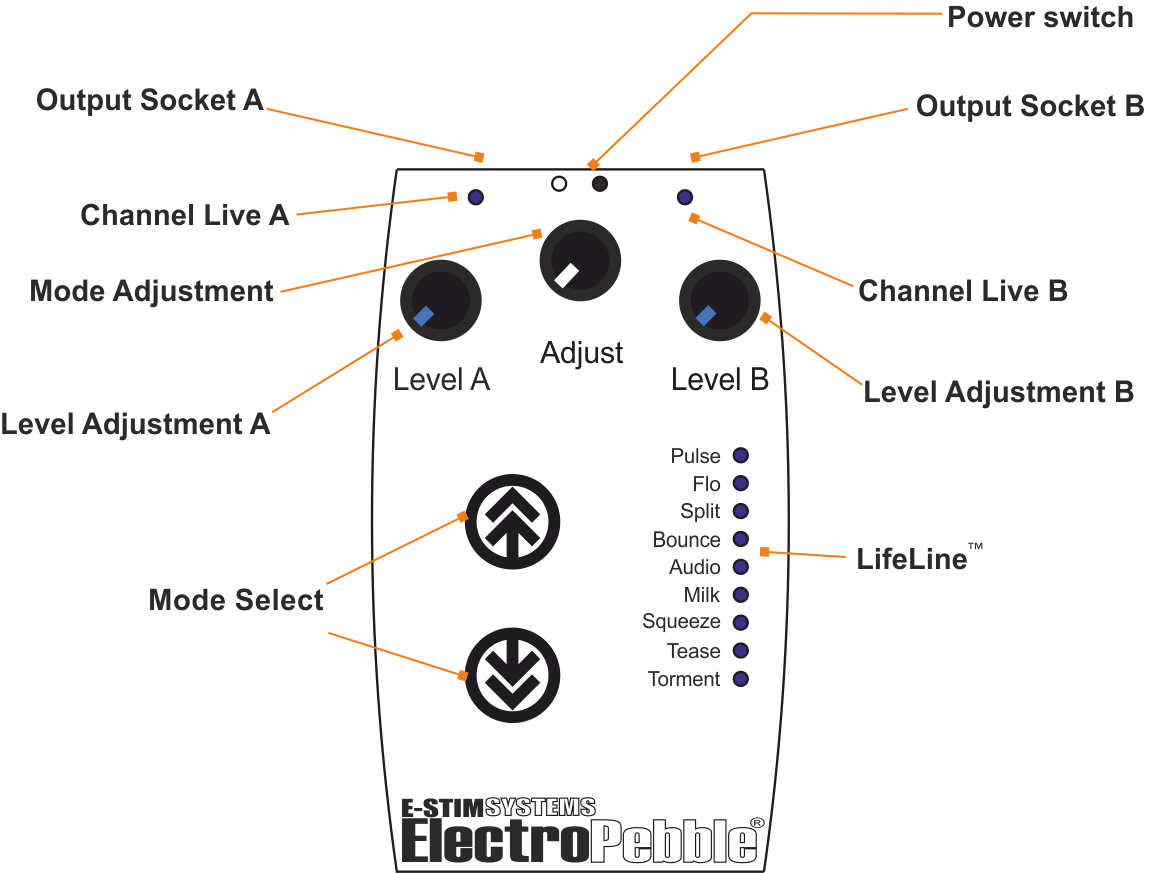
The ElectroPebble has a number of user controls. Each control allows the user to adjust a particular aspect of the output.
The displays tell you what is happening.
Power Switch This is located on the top of the unit and has two positions either OFF which is indicated by the '○' on the label or ON which is indicated by the '●' on the label.
Level A & Level B Controls These are the left-hand and right-hand rotary controls which control the output level for the left and right output sockets on the top of the unit. These are stepless controls which should allow the user to nd the exact level they require. Always start at zero and build up slowly.
Mode Adjust Control This is the centre rotary control and allows for various different adjustments to be made to the current mode.
Mode Select Buttons These are the two buttons on the left side of the unit with the up and down arrows on, ® and are used to change the program mode of the ElectroPebble.
Channel Live Indicators The channel Live indicators shows when the particular channel has an active output. ™
LifeLine™ The LifeLine shows the ElectroPebble Self test on startup, the battery level, the current mode and a cycling pattern when the outputs are active. The pattern is dependent on the current mode and the setting of the Adjust Control.
FITTING THE BATTERY
Make sure the power box is switched off, and unplug any electrodes.
Turn the box over and using a small amount of pressure press down on the ridged area and slide the cover towards the bottom of the unit.
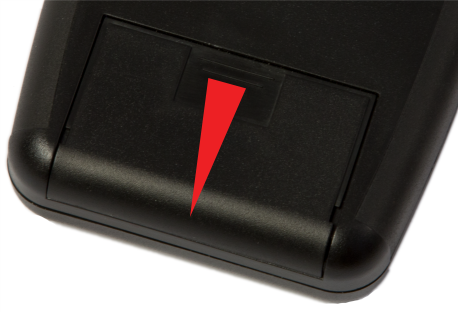
Remove the old battery (if fitted). You may need to use a small screwdriver or nail file to help gently lever the battery out.
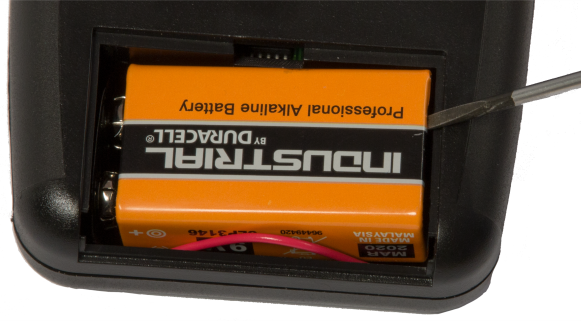
Replace with a fresh 9V Alkaline PP3.
The battery connector is polarized so it should be impossible to connect the battery incorrectly, but ensure you are connecting it the right way around before you plug the battery in.
Place the battery into the battery compartment making sure that the battery connector is to the left-hand side (as you look at it) and the battery cable runs along the bottom of the battery compartment.
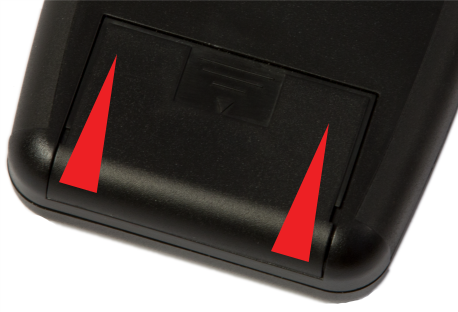
Replace the battery cover by sliding it back on until it clicks into place. The cover is designed to slide into place along a pair of rails, one on each side, and then click into place.
The ElectroPebble is now ready to use.
Please note we do NOT recommend the use of zinc carbon batteries due to their general poor performance. It is not possible to use a mains adaptor with the ElectroPebble. In the event your ElectroPebble is not being used for a period of time, remove the battery to avoid any potential damage from battery leakage.
GETTING STARTED
-
Before using the ElectroPebble, you should test the unit to make sure everything is working.
-
Make sure the Level Controls are set to minimum, by turning them both fully anticlockwise and the Power Switch is switched to the off '○' position
- Fit a battery into the ElectroPebble.
- Slide the Power Switch to the On '●' position. The ® LifeLine™ will then light up as your ElectroPebble goes through a self-test.
- Next the LifeLine™ will show the battery level. The more lights that light up the better the battery is. If less than half the LifeLine™ illuminates, then consider changing the battery. If a single LED illuminated then replace the battery immediately.
- A few seconds later the LifeLine™ should start to show a cycling pattern. The exact pattern is dependent on the current mode, and the ® setting of the Adjust Level. The ElectroPebble will normally start in Flo mode. You should also see both channel activity lights light up indicating that the outputs are active. If there is no LifeLine™ activity then check the battery connections and replace the battery with a known good device. If the LifeLine™ still fails to operate then email
This email address is being protected from spambots. You need JavaScript enabled to view it. for further instructions.
- Pressing either of the Mode Select buttons once will cause the ElectroPebble to stop the output and cause the LifeLine™ to change to show the current mode. ® After a few seconds the ElectroPebble will resume output and the Lifeline™ will restart. o Pressing either of the Mode Select buttons a second time whilst in mode select will change the mode to the next one in line.
Once you have chosen a mode just leave it for a few seconds and the ® ElectroPebble will then startup in the new mode.
Now its time to test the output
Turn the unit off and stick one Self-adhesive electro pad to the palm of your hand and another to the back of the same hand. Connect to the 2mm/TENS cable coloured plugs, one to each pad socket and then the power box via the jack socket above the Level A Control.
Make sure the Level Controls are still set to minimum and then turn the unit on and slowly turn the Level A Control up (clockwise). You should start to feel a slight tingling sensation from the electrode. If you do then everything is working. Turn the Level A Control back down, turn the box off and unplug the cable from that output jack and repeat the process using the other output jack and Level B Control.
Always bear in mind the safety warnings.
If you have problems
If the output feels lower than normal, check the battery level at start up and if it is below half then replace the battery with a new battery.
If you cannot feel any output despite the relevant Channel Live indicator being illuminated, and the corresponding Level Adjustment turned up and you have replaced the battery with a known good battery, then it is most likely the connecting wires so try changing them over.
Generally most problems can be solved by either replacing the battery or the cable.
USING ELECTRODES
Before using any electrode always make sure the Level Controls are still set to minimum and then turn the unit on and slowly turn the Level A Control up (clockwise). You should start to feel a slight tingling sensation from the electrode. If you do then everything is working. Turn the Level A Control back down, turn the box off and unplug the cable from that output jack and repeat the process using the other output jack and Level B Control.
Connection Cables
A connection cable has two plugs on one end, and a jack plug on the other. Each of the two coloured pin plugs insert into one socket on a pad, or into one end of one Loop, or into each of the sockets on an insertable electrode.
® The jack plug then plugs into one of the output sockets on the top of the ElectroPebble. Do ® not connect or disconnect any electrode while the ElectroPebble is turned on, or you may receive an inadvertent shock.
To remove a connection plug gently twist the body of the plug as you pull whilst holding the socket stationary. Do not pull the cable. Two points of Contact Electroplay always needs at least two points of contact in order for it to work. Electrodes are generally either monopole (meaning single point of contact) or they are bipolar (meaning there are two points of contact).
Surface Electrodes
All the ElectroPebble Packs are supplied with 4 re-usable self-adhesive monopole electro pads. These are used in pairs and stick to the surface of the skin. When you have finished using them they should be returned to the plastic carrier sheet for protection.
Pad Placement
Self-adhesive monopole electro pads work well on inner thighs, buttocks, pelvic mound and even the penis or scrotum – the choice is yours.
Peel the pad from the plastic carrier sheet and stick it to the surface of the skin where you want to use it. There is no need to use any conductive gel as the pads are designed to be used without it.
To remove the pads, first ensure the Level Controls are turned down and the ElectroPebble is switched off. Take hold of one of the corners of the pad and slowly peel the pads off the skin and replace it on the plastic carrier sheet.
The closer the pads are together, the more intense the sensation, but make sure the pads do not touch each other.
You may feel more sensation in one location than the other. This is the nature of e-stim and is normal - Just try moving the pads and experiment with positions to nd what works best for you.
CLEANING
Do NOT use solvents to clean the ElectroPebble. A gentle wipe with a soft damp cloth ® should be sufficient. It is not possible to sterilise the ElectroPebble. Self-adhesive monopole electro pads cannot be cleaned but are reusable. To prolong their lifespan always return them to their protective carrier sheet after use.
PROGRAM MODES
The ElectroPebble has 9 adjustable modes.
By default when the ElectroPebble is first turned on, once it has completed the self-test sequence, it will start in Flo mode. To change mode press either of the Mode Select Buttons once, this will show the current mode. Now press and release either of the Mode Select Buttons once to step to the next mode, either up or down, and then continue to press and release the Mode Select Button until you get to the desired mode. Once you are at the mode you want, simply wait a few seconds and the mode with start. The Mode Adjustment Control allows your to fine tune each mode to your particular tastes. Always ensure you turn the output controls down before changing mode.
| Mode | What's the Mode? | What Adjust does. |
| Pulse | The outputs pulse on and off. | Changes the speed of the pulse. |
| Flo | A continuous owing sensation, hence the name. | Changes the 'Feel' from soft to hard. |
| Split | A cross between Pulse and Flo. One output Pulses and the other Flo's | Changes the speed of the pulsing on Output B. |
| Bounce | The outputs ‘Bounce’ from one side to the other. | Changes the speed of Bouncing. |
| Audio | The output responds to sound. | Controls the sensitivity of the microphone. |
| Milk | A pulsing output that gradually Speeds up and then slows down again. | Controls the speed of the cycle. |
| Squeeze | A pulsing output that gradually Speeds up, stops and then starts again. |
Controls the speed of the cycle. |
| Tease | .A continuous output that gradually increases the 'Feel' from soft to hard and back again. |
Controls the speed of the cycle. |
| Torment | A continuous output that slowly increases the 'Feel' from soft to hard and then quickly drop back again before restarting. |
Controls the speed of the cycle. |
DO'S AND DON'TS
DO NOT CONNECT ABOVE THE WAIST (ACROSS THE ARMS COUNTS AS ABOVE THE WAIST!), BUT ESPECIALLY DO NOT CONNECT ACROSS THE HEART, CHEST, NECK OR HEAD. DO NOT USE IF FITTED WITH A PACEMAKER OR ARE PREGNANT. REMEMBER YOU USE THIS DEVICE AT YOUR OWN RISK.
If you or your play partner experiences any pain or discomfort then stop using immediately. Any E-Stim device is potentially capable of causing burning when used on sensitive and or small contact areas at high output levels.
DO NOT SHORT CIRCUIT the output. Doing so may damage the unit.
DO NOT attempt to open the ElectroPebble. High voltages are present during use and may still exist when the unit is switched off.
There are no user serviceable parts inside and opening the ElectroPebble will invalidate the Lifetime guarantee. The connection cables may become detached from the ElectroPebble if pulled. This is a safety feature so if you find this to be a problem during play, then we suggest you purchase slightly longer cables.
Storage
® In the event that the ElectroPebble unit is not going to be used for a period of time always remove the battery to avoid any possibility of damage being caused by battery leakage.
(DO NOT CONNECT THE POWER BOX OR ANY ELECTRICAL DEVICE TO ANY LOCATION ABOVE THE WAIST (ACROSS THE ARMS COUNTS AS ABOVE THE WAIST!), BUT ESPECIALLY DO NOT CONNECT ACROSS THE HEART, CHEST, NECK OR HEAD. DO NOT USE IF FITTED WITH A PACEMAKER OR ARE PREGNANT. REMEMBER YOU USE THIS DEVICE AT YOUR OWN RISK. YOU MUST READ AND UNDERSTAND THE USER MANUAL AND ALL OTHER INSTRUCTIONS BEFORE ATTEMPTING OPERATION.#
XPE Pack
ELECTROPEBBLE XPE PACK ®
In addition to the contents of the ElectroPebble pack the XPE pack includes a pair of 2mm Conductive Rubber Loops and a Medium Electro Egg.
Conductive Rubber Loops
These are a pair of monopole contact electrodes and so need to be used either as a pair or in combination with another contact. To use them as a pair you will need both Loops and one of the 2mm/TENS cables provided. Plug one of the coloured pins of the cable into one end of one Loop, and the other coloured pin into one end of the other Loop. A good tip is to put a small amount of conductive gel on each pin before inserting them as this helps when inserting them and also when you come to unplug them. Do NOT plug both pins into the same Loop.
Add Gel
Now spread a thin layer of conductive gel on the penis and then place the Loops over the penis. A good placement is to put one Loop at the base of the penis and the other just behind the head. Make sure that the Loops do not touch each other. Once in position tighten them by pulling the two ends of the Loop gently away from each other and the toggle will tighten. A good contact is needed for the Loops to work properly.
Turn Off And Connect
Make sure the ElectroPebble is turned off and both Level Controls are turned fully anticlockwise. Then plug the 3.5mm jack plug from the cable into one of the output sockets. on the top of the ElectroPebble
Now turn the ElectroPebble on and once it has completed the start-up sequence choose a mode and Slowly start to turn the corresponding Level Control clockwise to increase the output until you feel a sensation.
To Remove
To Remove the Loops, turn the Level Controls down and then turn off the ElectroPebble Now unplug the cable from the output socket. Squeeze the spring catch on the centre of the toggle on the Loop and gently pull the toggle away from the penis to loosen the Loop. Once off the penis remove the coloured pins from the Loops by holding the end of the Loop and gently pulling the body of the pin out of the Loop whilst gently twisting it.
Do not pull on the cable.
The Conductive Rubber Loops can be used in combination with the self adhesive electro pads, simply replace one of the Loops with a pad.
Medium Electro Egg
This is a bipolar insertable electrode and so can be used on its own. It is suitable for both vaginal or anal use and is tted with a 1.5M cable with a re-enforced 'tail' and a 3.5mm jack plug at the other end.
To use the Electro Egg cover it with a thin layer of conductive gel and then gently insert it fully into either the vagina or anus.
Making sure that the ElectroPebble is turned off and that both the Level Controls are turned down. Plug the 3.5mm jack plug into one of the output sockets. Now turn the ® ElectroPebble on and once it has completed the start-up sequence, select a mode and then slowly start to turn the corresponding Level control clockwise until you feel a tingling sensation.
To Remove the Electro Egg first turn the Level Control all the way down turn the ElectroPebble off and remove the jack plug from the output socket. Now relax and using the re-enforced 'tail' gently pull the Electro Egg out.
NOTE : You cannot use a condom over the electrode.
Cleaning
The Conductive Rubber Loops can be cleaned with medical grade cleaning wipes or washed using a mild soap in warm water, having removed the toggle rst. Once clean towel dry and then reassemble. The Electro Egg is not designed to be disassembled for cleaning. Simply use a sex toy cleaner, medical grade cleaning wipes or a damp cloth using hot water and a mild detergent. Do not use caustic cleaning substances that may damage the Electro Egg or immerse it for cleaning.
XPF
ELECTROPEBBLE XPF PACK
® In addition to the contents of the ElectroPebble pack the XPF pack includes a pair of 2mm Conductive Rubber Loops and a Flange Electrode.
Conductive Rubber Loops
These are a pair of monopole contact electrodes and so need to be used either as a pair or in combination with another contact.
To use them as a pair you will need both Loops and one of the 2mm/TENS cables provided. Plug one of the coloured pins of the cable into one end of one Loop, and the other coloured pin into one end of the other Loop. A good tip is to put a small amount of conductive gel on each pin before inserting them as this helps when inserting them and also when you come to unplug them. Do NOT plug both pins into the same Loop.
Add Gel
Now spread a thin layer of conductive gel on the penis and then place the Loops over the penis. A good placement is to put one Loop at the base of the penis and the other just behind the head. Make sure that the Loops do not touch each other. Once in position tighten them by pulling the two ends of the Loop gently away from each other and the toggle will tighten. A good contact is needed for the Loops to work properly.
Turn Off And Connect
Make sure the ElectroPebble is turned off and both Level Controls are turned down. Then plug the 3.5mm jack plug from the cable into one of the output sockets on the top of the ElectroPebble
Now turn the ElectroPebble on and once it has completed the start-up sequence choose a mode and Slowly start to turn the corresponding Level Control up to increase the output until you feel a sensation.
To Remove
To Remove the Loops, turn the Level Control fully down and then turn off the ®. ElectroPebble Now unplug the cable from the output socket. Press the spring catch on the centre of the toggle on the Loop and gently pull the toggle away from the penis to loosen the Loop. Once off the penis remove the coloured pins from the Loops by holding the end of the Loop and gently pulling the body of the pin out of the Loop whilst gently twisting it. Do not pull on the cable.
The Conductive Rubber Loops can be used in combination with the self adhesive electro pads, simply replace one of the Loops with a pad.
The Flange Electrode This is a bipolar insertable electrode and so can be used on its own. It is suitable for both vaginal or anal use and is tted with two 4mm sockets in the base.
To use the Flange electrode, rst connect it to the 4mm cable by inserting the coloured 4mm banana plugs into each of the sockets on the base of the Flange. The centre socket is for the head of the Flange and the other socket is for the base.
Now cover it in a thin layer of conductive gel and then gently insert it into either the vagina or anus.
Making sure that the ElectroPebble is turned off and that both the Level Controls are turned down. Plug the 3.5mm jack plug ® into one of the output sockets. Now turn the ElectroPebble on and once it has completed the start-up sequence, select a mode and then slowly start to turn the corresponding Level control up until you feel a tingling sensation from the electrode.
To Remove the Flange first turn the Level Controls all the way down and then turn the ® ElectroPebble off and unplug the jack plug from the output socket. Relax and using the base of the Flange gently pull it out. Do not pull on the cables.
NOTE : You cannot use a condom over the electrode.
Cleaning
The Conductive Rubber Loops can be cleaned with medical grade cleaning wipes or washed using a mild soap in warm water, having removed the toggle rst. Once clean towel dry and then reassemble. The Flange can be cleaned using a sex toy cleaner, medical grade cleaning wipes or hot water with a mild detergent.
ElectroPebble SPECIFICATIONS
| Channels/ Outputs | Dual channel, dual output mono 3.5mm sockets. |
| Display | High brightness Light Emitting Diodes indicating Status, Battery Level, Channel and Mode Activity. |
| Operating Modes | 9 - Pulse, Flo, Split, Bounce, Audio, Milk, Squeeze, Tease and Torment |
| Controls | Power Switch, 2 x Level Controls, Mode Adjust Control, 2 x Mode Select Buttons. |
| Output Waveform | Asymmetrical pulsed AC Output Type BF |
| Micro Pulse Frequency | Variable 55Hz to 360Hz |
| Burst Pulse frequency | 0.5 - 33 Hz |
| Power Supply Standard | 9 Volt Alkaline (PP3) |
| Battery Life | Variable dependent on load |
| Dimensions(approx.) | 116mm x 77mm x 38mm |
| Weight (with battery) | 176g |
CERTIFICATE OF CONFORMITY
US Regulatory Wireless Notice This device compiles with Part 15 of the FCC Rules. Operation is subject to the following two conditions: (1) this device may not cause harmful interference, and (2) this device must accept any interference received, including interference that may cause undesired operation.
The FCC requires the user to be notied that any changes or modifications made to the device that are not expressly approved by E-Stim Systems Ltd may void the users authority to operate the equipment.
European Union Notice
Products bearing the CE marking comply with the R&TTE Directive (1995/5/EC), EMC Directive (89/336/EEC), and the Low voltage Directive (73/23/EEC) issued by the Commission of the European Community.
Compliance with these directives implies conformity to the following European norms (in parentheses are the equivalent international standards and regulations.)
EN 55022 (CISPR 22) – Electromagnetic Interference , EN 55024 (IEC61000-4-2,3,4,5,6,8,11) – Electromagnetic Immunity, and EN 60950 (IEC 60950) – Product Safety.
This device may be used in all European Union Countries.
Sold as an adult novelty device only. Not to be used by children.
EU and Norway only: Products bearing the WEEE symbol should not be disposed of in normal household waste, but returned to us or your nearest WEEE registered recycler for safe disposal.
COPYRIGHT NOTICE
All images and text within this manual are ©E-Stim Systems Ltd 2007-2016.
ElectroPebble is a registered trademark of E-Stim Systems Ltd
XPE, XPF and Flange™ are trademarks of E-Stim Systems Ltd.
All rights reserved.
E & OE.
PROBLEMS?
If the output feels lower than normal, then replace the battery.
If there is no output, and you have replaced the battery with a known good battery, then suspect the connecting wires.
If things still don't appear to be working then email us at stating the serial
There are no user serviceable parts inside and breaking of any seals will ®, ™ invalidate your guarantee.
The ElectroPebble Flange and Electro Egg (excluding cable) are all guaranteed (parts and labour) against failure caused by manufacturing defects or failure during normal use for the lifetime of the unit.
Do not return the unit for repair without contacting us for a returns number before you dispatch.
For more details regarding our lifetime guarantee, product registration and our full range of e-stim products, then visit our website at
Our lifetime guarantee does not affect your statuary rights.
